Ground instructor in IACRA
How to complete FAA Form 8710-1 in IACRA for a basic, advanced or instrument ground instructor certificate or added rating.
Before you start
- Have an IACRA account. Register as an Applicant at iacra.faa.gov. Your FAA Tracking Number (FTN) is shown at the top left of your console. New to IACRA? See getting started in IACRA.
- Pass your knowledge tests. You need the Basic, Advanced or Instrument Ground Instructor knowledge test for each rating, plus the Fundamentals of Instructing (FOI) test unless an exception applies. Results are valid for 24 calendar months.
- Know whether the FOI exception applies to you. The FOI test is not required if you already hold a ground or flight instructor certificate, hold a state or local teacher’s certificate for 7th grade or higher, or are employed as a teacher at an accredited college or university.
- No medical certificate and no flight time are needed.
See the ground instructor service page for what each rating lets you teach.
Step 1: Start a new application
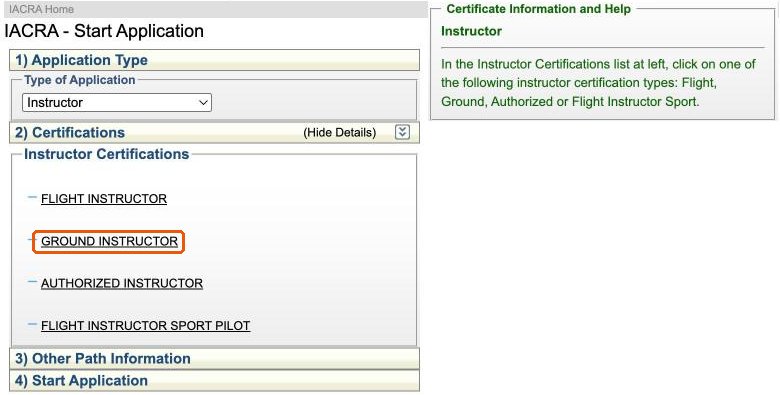
Log in as an Applicant and click Start New Application. Choose Instructor as the application type, then click Ground Instructor.
Step 2: Choose the path and ratings
Click Standard, then CFR 61, then the type of issuance:
- Original Issuance: you do not hold a ground instructor certificate yet.
- Added Category/Class Rating: you hold a ground instructor certificate and are adding a rating, such as instrument to an existing advanced rating.
Under Certificate Category/Class, select the ratings you passed the knowledge tests for. If you are getting two ratings at once, choose the combined entry: Basic and Instrument or Advanced and Instrument. Then click Start Application.
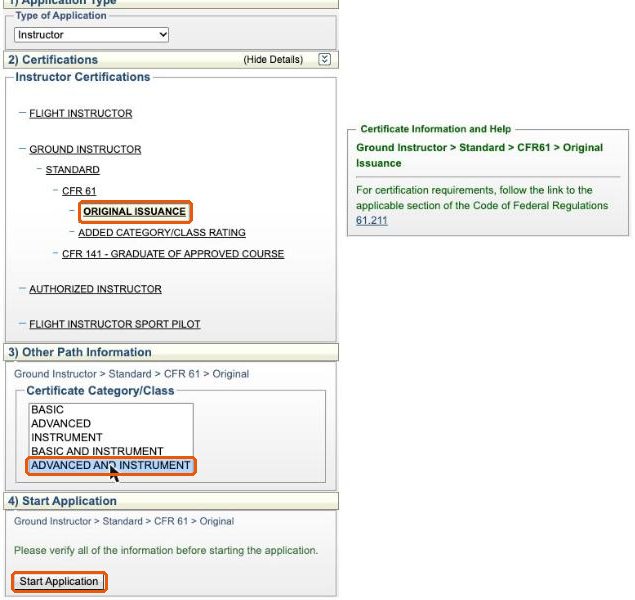
CFR 141 - Graduate of Approved Course is only for applicants who completed a ground instructor course at a Part 141 school.
Step 3: Personal information
The Applying For line confirms your path and ratings. Check your personal information, height, weight, hair and eye color, contact details and address, then click Save.
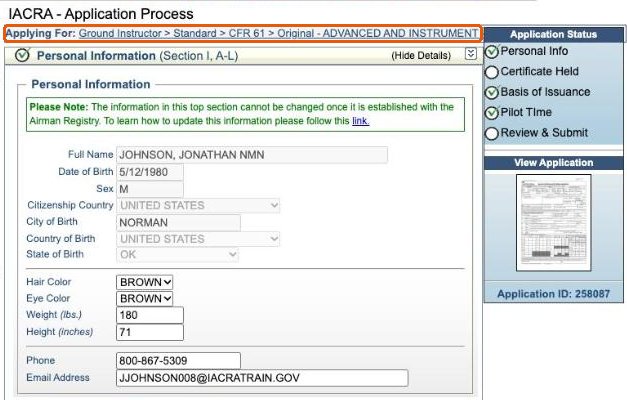
Check your mailing address. If you want your certificate mailed somewhere other than your residential address, use Add Mailing Address at the bottom of this section.
Step 4: Certificate held
Answer the English language and drug conviction questions. If you hold, or have ever held, an FAA pilot certificate, including a student pilot certificate, check the Airman Certificate box. A flight instructor certificate you hold is also what supports the FOI exception, so make sure it appears here.
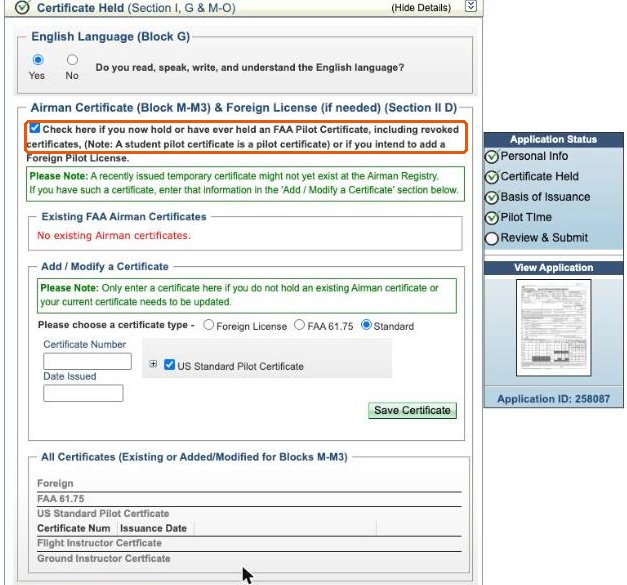
If IACRA finds your certificates, they are listed under Existing FAA Airman Certificates. If not, or if a certificate was issued recently, use Add / Modify a Certificate to enter its number and date issued, then click Save Certificate. Leave the medical certificate box unchecked unless you hold one. Click Save.
Step 5: Basis of issuance and pilot time
The Basis of Issuance section reads No information needed in this section. Click Save. Pilot Time is already marked complete.
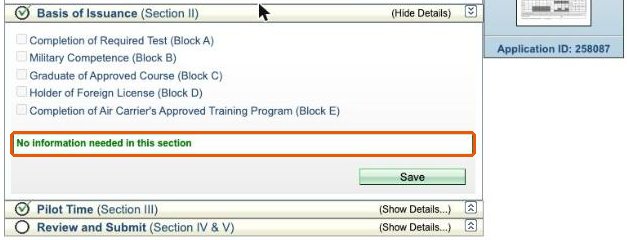
You do not enter your knowledge test results. There is no place for them in your application. Send your test reports to your examiner, who enters them when processing the application.
Step 6: Review and submit
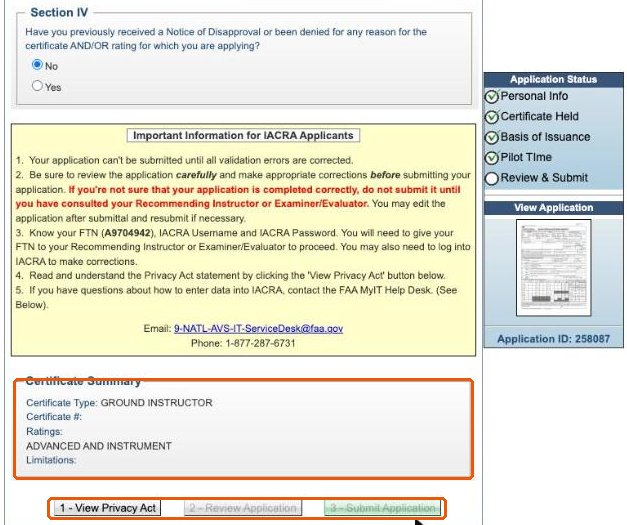
Open Review and Submit and answer the Notice of Disapproval question. The Certificate Summary should show Ground Instructor and the ratings you selected. A ground instructor application has three buttons, which unlock in order: 1 - View Privacy Act, 2 - Review Application and 3 - Submit Application.
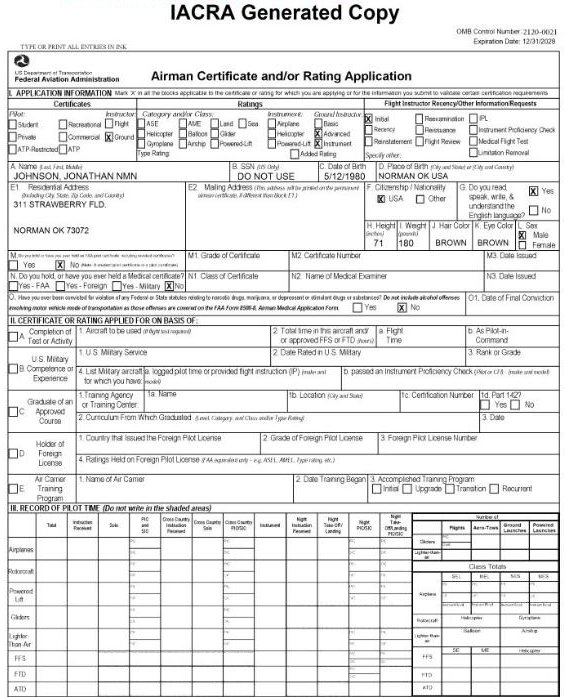
The generated FAA Form 8710-1 has Ground marked under Instructor, your ground instructor ratings marked under Ratings, and Initial marked for an original issuance.
Click Submit Application. The confirmation shows your Application ID and FTN. Send both to your examiner.
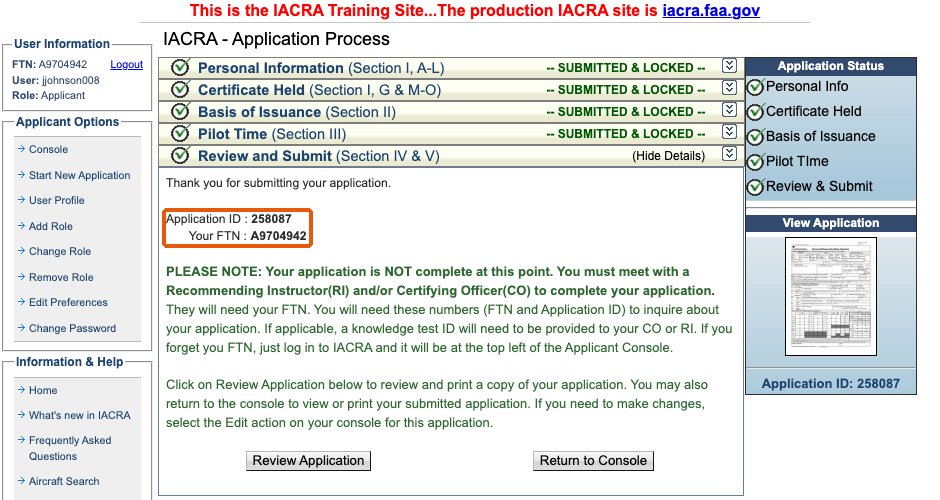
Step 7: Sign your application
The examiner retrieves your application with your FTN and enters your knowledge test results. When its status changes to Ready for Applicant Signature, log back in to IACRA, open the application from your console and sign it with your password. The examiner then verifies your identification, signs, and you receive a temporary certificate. The permanent certificate is mailed by the FAA.
Working with ATACS
ATACS processes ground instructor certificates remotely, nationwide. Send a request with the rating you are seeking. AGI and IGI ratings issued at the same appointment are one fee.