SOE limitation removal in IACRA
How to complete the IACRA application to remove the supervised operating experience (SOE) limitation from your type rating under 14 CFR 61.64(g).
Before you start
- Complete your 25 hours. Under 14 CFR 61.64(g), you fly 25 hours in the type named in the limitation, performing the duties of pilot in command, under the direct observation of a pilot in command who holds that type rating without limitations. See Understanding SOE limitations for who can observe and what counts.
- Have your evidence ready before you build the application (see Your evidence below).
- Have an IACRA account. Register as an Applicant at iacra.faa.gov. Your FAA Tracking Number (FTN) is shown at the top left of your console. New to IACRA? See getting started in IACRA.
More than one SOE limitation? Say so in the notes when you send your request.
Step 1: Choose the limitation removal path
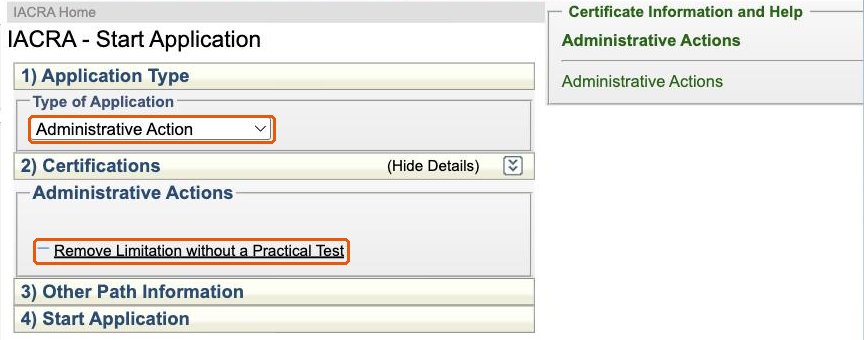
Log in as an Applicant and click Start New Application. Choose Administrative Action as the application type, then click Remove Limitation without a Practical Test.
Step 2: Confirm the limitation
IACRA finds your pilot certificate and shows its grade and date of issuance. The limitations on your record are listed below them. Your SOE limitation reads THE [type] IS SUBJECT TO PILOT-IN-COMMAND LIMITATION(S) and is usually selected already. Make sure it is the one highlighted, then click Start Application.
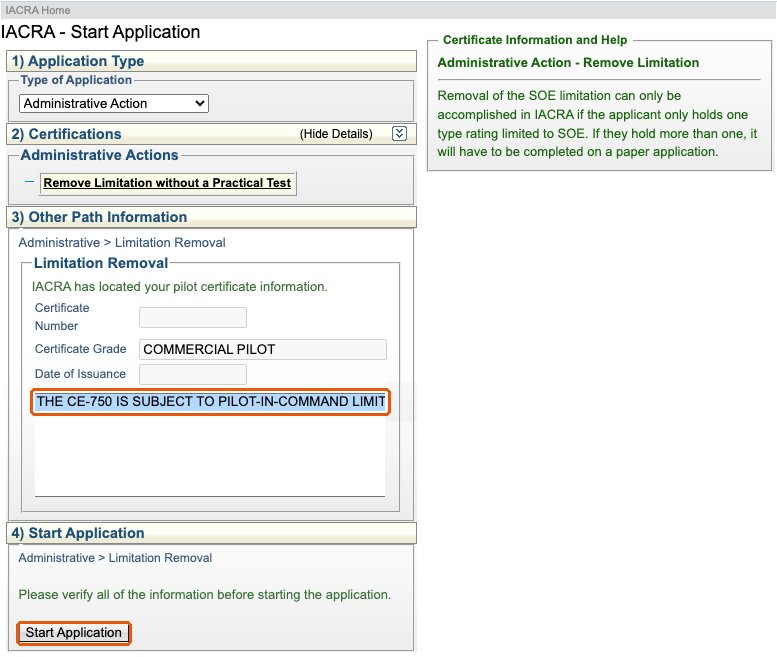
If the limitation is not listed, or the type does not match your certificate, stop and contact your examiner. IACRA only lists limitations that are on your airman record.
Step 3: Personal information and certificate held
Check your personal information, contact details, residential address and certificate information as you would for any application, and click Save in each section.
Check Do Not Use for your Social Security number if IACRA shows the SSN field. The SSN is optional on FAA Form 8710-1.
Step 4: Pilot time
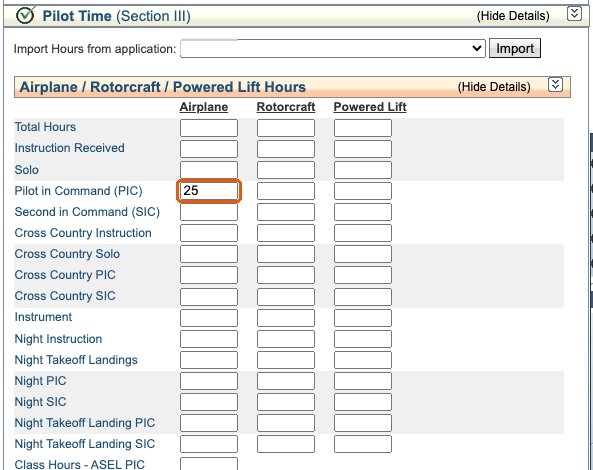
Section III, Pilot Time, is the one that needs attention. IACRA will not let you submit until it shows at least 25 hours of pilot in command time.
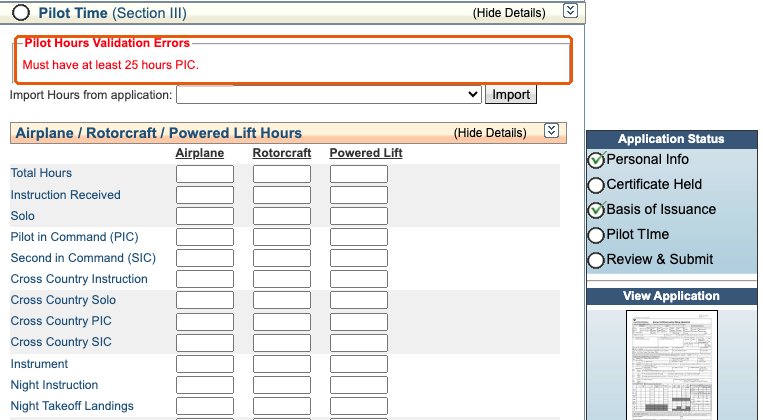
Enter only your supervised operating experience hours in the Pilot in Command (PIC) row, in the column for the aircraft category, which is Airplane for an airplane type rating. Click Save.
Do not add your other pilot time. FAA guidance says that when this section is used to record the SOE hours, it must not include any other hours, so the 25 hours in the limited type stay easy to see. If your total PIC time goes in the same box, the SOE hours are lost in it. See FAA Order 8900.1, Volume 5, Chapter 2, Section 5, paragraph 5-324.
Step 5: Review and submit
Open Review and Submit, answer the Notice of Disapproval question, and review the generated FAA Form 8710-1. In Section I, the limitation removal is marked with See Comments. The comment naming the removed limitation is added only when the examiner processes the application, so do not worry that it is missing from your copy.
Check that the form names your type rating. Under paragraph 5-324, the type rating designation shown in your limitation (for example, CE-750) should appear in Section I after Type Rating, and in Section II, Block A, under Aircraft to be Used, with your SOE hours as pilot in command. The Added Rating box is not checked, because no rating is being added. If IACRA lets you enter the aircraft, use that type designation. If the type is missing from your copy, tell your examiner, who confirms it before signing.
Submit the application and send your FTN and Application ID to your examiner.
Your evidence
The examiner reviews your evidence before completing the application. Keep it organized so each flight is easy to verify:
- A written attestation for each flight from the observing pilot in command. It should identify the flight (date, aircraft, route and time) and include the observer’s name, signature and certificate number, and that they hold the type rating without limitations. A single letter covering “about 25 hours” does not meet the requirement.
- Your logbook entries for those flights, with the flights you are counting marked so they match the attestations.
- A running total showing the flights add up to at least 25 hours.
Operator training or operating experience records do not replace the logbook entries and written attestations the regulation requires.
What the examiner does
The examiner retrieves your application with your FTN, verifies your identification, reviews your logbook and attestations, and removes the limitation. The comments page of the completed 8710-1 records that the certifying officer removed the limitation, and the examiner’s report reads “Removal of SOE limitation from [type rating designation] with 25 hours.” If IACRA asks for your signature after submitting, the status changes to Ready for Applicant Signature; log back in and sign it. The examiner then signs, and you receive a temporary certificate without the limitation. The permanent certificate is mailed by the FAA.
Working with ATACS
ATACS processes SOE limitation removals remotely, nationwide. Send a request with your type rating and how many hours you have completed. The examiner reviews your flights and attestations first and tells you if anything is missing before you build the application.